
If you’ve ever worked with an E-Ink display—whether for an e-reader, EPD, or custom IoT project—you’ve likely encountered a small but critical component: the TCON Board.
While the main processor often takes the spotlight, the TCON (Timing Controller) board is the unsung hero that makes the low-power, paper-like display experience possible. Without it, an E-Ink panel can’t function at all — it’s not an optional performance upgrade, it’s the component that translates image data into the specific voltage sequences E-Ink’s microcapsules need to move. This guide explains what a TCON controller board is, why it’s indispensable for E-Ink displays, and how to select the right one for your application.
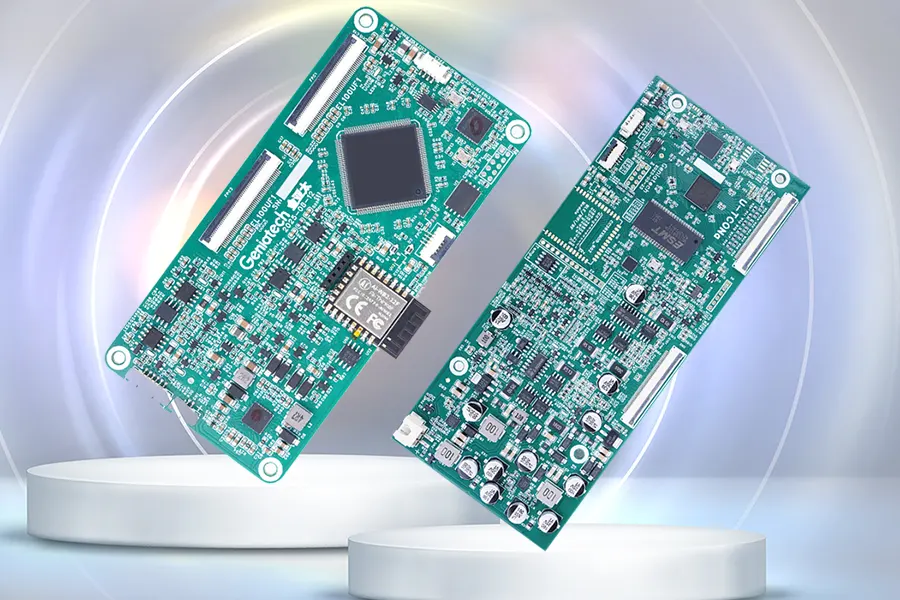
What is a TCON Board?
TCON stands for Timing Controller Board, a dedicated hardware component that acts as a translator and orchestrator for display systems. Positioned between the main processor and the E-Ink panel, it performs several essential tasks:
- Timing Signal Control – Converts image data from the main processor (e.g., LVDS, MIPI, DSI) into the precise driving sequence required by the E-Ink screen.
- Resolution & Refresh Management – Manages different refresh modes (partial/full refresh, grayscale control, temperature compensation).
- Waveform Control – Generates the correct waveform signals to drive the microcapsules inside E Ink panels, ensuring high-quality grayscale and image stability. (See the e-paper glossary for a fuller breakdown of waveform, grayscale, and related terms.)
- Power & Interface Management – Integrates SPI, I²C, UART, and power circuits to communicate and control display operations.
- Multi-Screen Synchronization – Enables coordinated refresh or independent display across multiple panels, especially in large signage systems.
In short, if the main processor is the brain, the TCON driving board is the nervous system—precisely timing how each pixel behaves to create a stable and accurate image.
Typical Features of an E-Ink TCON Board
| Feature | Description |
|---|---|
| Input Interface | LVDS / eDP / MIPI / SPI |
| Output Interface | ePaper display interface (parallel or serial) |
| Control IC | Uses official E Ink or partner-certified driver chips |
| Supported Sizes | From 6″ and 10.3″ to 32″, 42″, and even 75″ |
| Functions | Partial refresh, grayscale waveform, temperature compensation, EPD LUT |
| Power Management | Integrated high-voltage generation (VCOM, VEE, VDD, VNEG, etc.) |
Why is the TCON Board Especially Critical for E-Ink?
While TCON boards are common in LCDs, they are absolutely essential for E-Ink due to its unique driving mechanism:
- High Voltage Requirements – E-Ink capsules require higher voltages than typical microcontrollers can provide.
- Complex Waveforms – Each pixel refresh involves a unique voltage sequence (waveform) to control ink particle movement precisely.
- Strict Timing Control – Incorrect timing can cause ghosting, flickering, or even permanent image retention.
Thus, using a TCON board matched to your E-Ink panel model is crucial for both display quality and long-term reliability.
How to Choose the Right TCON Board for Your E-Ink Display
1. Match Core Specifications
Resolution & Refresh Rate Ensure the TCON supports your panel’s native resolution (e.g., 1024×758, 2260×1440, or 3000×2000). High-end models like the E Ink Gallery 3 4K require a comparably 4K-capable TCON. E-Ink displays operate at low refresh rates (≤10Hz), so timing compatibility for partial and full refresh modes is more critical than frame rate.
Interface Protocols
- Input (to Mainboard):
- MIPI-DSI for compact, low-power devices (e-readers, tablets).
- SPI for small ESL or handheld devices.
- LVDS/MiniLVDS for larger, high-resolution signage.
- USB-C (DP Alt) for PC-connected E Ink monitors.
- Output (to Panel): Match the panel’s COF/COG connector (e.g., 20/30-pin FPC) and signal type (TTL, mLVDS).
Power and Consumption Choose a board that supports the required voltage outputs (e.g., VGH=20V, VGL=-15V) and includes low-power sleep modes (≤2mW), ideal for battery-powered applications.
2. Choose by Application Type
Consumer Devices (e-Readers, Office Tablets)
- Compact, integrated TCON design
- MIPI-DSI input + COF output
- Temperature compensation for -10°C to 50°C
- Example: 6–10.3″ Carta display Timing Controller with partial refresh
Industrial Devices (ESL, Logistics Tags)
- Independent SPI-based design
- Wide voltage range (3.3V–12V)
- ESD protection and low refresh rate (≤1Hz)
Large Displays (Signage, E Boards, Outdoor Panels)
- LVDS input for long-distance transmission
- Gamma correction and anti-flicker circuits
- Supports up to 4K E Ink Gallery 3 panels
Flexible or Wearable Devices
- FPC-based flexible Display Controller boards
- Integrated COG interface and ultra-low-power mode
3. Additional Functional & Compatibility Checks
- E Ink Algorithm Support: Choose TCONs with native support for Kaleido™ 3 or Gallery™ 3 rendering.
- Firmware Upgradability: I²C/SPI interface for future waveform or algorithm updates.
- Status Feedback: Interrupt pins for refresh-complete and fault alerts.
- Environmental Validation: Test across -20°C to 60°C and voltage fluctuation ranges (±10%).
4. Supplier & Cost Considerations
- Top-tier compatibility: E Ink–partnered TCON vendors with established track records.
- Industrial-grade: suppliers with proven ESD/EMI compliance and long-term component availability.
- Cost-effective options: domestic and regional suppliers can offer competitive pricing, but validate their long-term supply stability before committing.
- For high-volume orders: Opt for semi-custom or co-developed solutions to reduce per-unit cost.
Commercial TCON Solutions for Color E-Paper
Commercial TCON platforms differ significantly in capability. Some provide only basic panel driving, while others integrate waveform optimization, firmware, SDKs, and multi-display synchronization to simplify product development.
For example, MyGica offers TCON and controller solutions for both monochrome and color E-Paper displays across sizes from 10″ to 75″ and beyond, helping simplify integration for a wide range of reflective display applications. Features such as FPGA-accelerated waveform processing, flexible MCU/SoC interfaces, and multi-display synchronization can help reduce development complexity for large deployments.
Conclusion
The TCON board is far more than a simple adapter—it’s a precision controller built to handle the unique physics of E-Ink technology. Understanding its function and selecting the right model ensures your display performs at its best—whether you’re developing a compact e-reader or a large-scale digital signage system.
Frequently Asked Questions
Can I use any TCON board with any E-Ink panel?
No. The TCON has to match the panel’s resolution, waveform requirements, and connector type. Mismatches typically cause ghosting, incorrect grayscale, or the display not working at all — panel and TCON are effectively a matched pair, not interchangeable components.
What’s the difference between a TCON board and a display driver IC?
The driver IC sits closer to the panel and directly applies voltage to the pixels; the TCON sits upstream, translating image data from the host processor into the timing and waveform sequences the driver IC then executes. In many designs, both functions are combined onto a single board.
Do color E-Ink panels need a different TCON than monochrome ones?
Generally yes. Color panels like E Ink Spectra 6 require more complex waveform processing to render multiple pigment states, so their TCON boards typically need more processing capability than a monochrome-only design.