
Walk into a supermarket early in the morning and you’ll often see staff replacing promotional posters throughout the produce department. By afternoon, some of those prices may already have changed again.
Fresh produce pricing is one of the most dynamic parts of grocery retail. Procurement costs fluctuate, inventory turns quickly, and same-day promotions are common. As a result, prices may change several times a day — far more often than traditional signage was designed to handle.
That’s where full-color e-paper fits. Neither of the two traditional signage approaches actually fits that update pattern well, and the gap between them is where it has found real, practical traction.
The Real Cost of Traditional Pricing Signage
Paper price tags and POP signage carry more cost than the paper itself. Every price change means printing, cutting, and physically re-posting — multiplied across every affected point in the store, with a staff member walking the floor tag by tag. That’s direct labor cost, and it’s also where pricing errors creep in at this frequency.
There’s a second cost that procurement teams often underweight: promotion delay. Even when a price change is pushed centrally, printed signage can’t be deployed instantly. A promotion set to start at 10:00 AM often doesn’t actually go live on the shop floor until 11:30, or later, because every location has to physically replace signage by hand before customers see the new price. That gap between “the price changed in the system” and “the price is visible in the store” is a recurring, quantifiable business cost — and it compounds across a multi-store chain, where different locations end up going live at different times for the same nominal promotion.
Traditional LCD/LED signage solves the reprinting problem, and it supports full-motion video content paper can’t. But it continuously consumes power, because the backlight stays on whether or not the displayed information has actually changed — a meaningful cost at the scale of a dense cluster of price and promotional displays running all day, every day, in a fresh section specifically. Backlit screens also tend to glare under the bright, even lighting typical of a fresh section, which works against the readability the signage is there to provide in the first place.
How Full-Color E-Paper Closes This Gap
The short version: e-paper only draws power when content actually changes, and it can update just the price on a display without touching the rest of the image. That combination is what makes it fit this specific pricing pattern better than either paper or backlit signage.
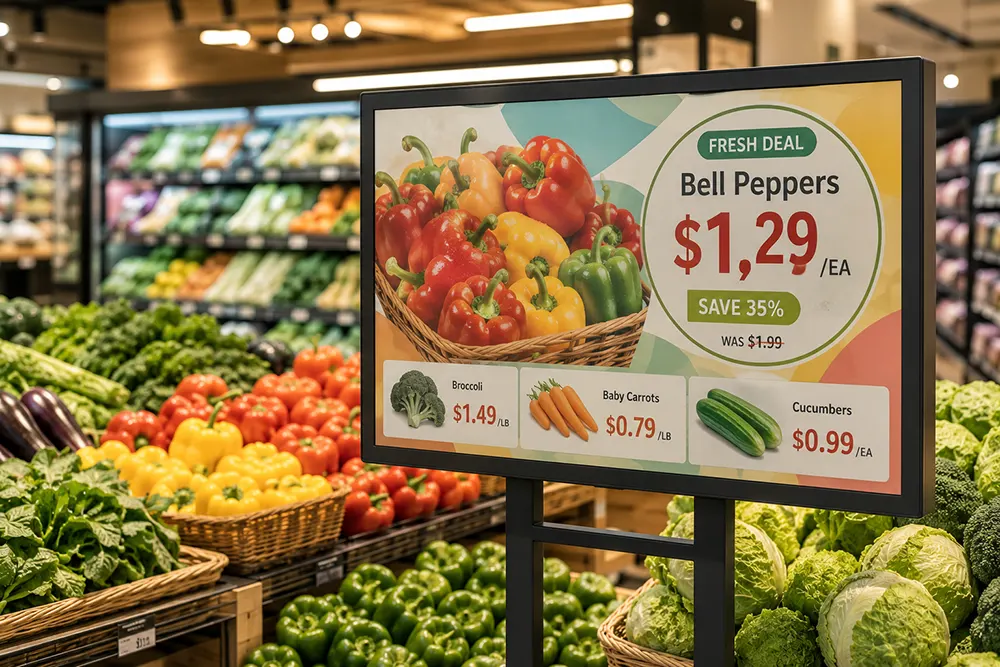
In practice, a fresh-section layout typically splits into two zones — a stable visual zone (product imagery, brand color, promotional messaging, changed infrequently) and a frequently updated price zone (the number itself, a discount callout, a “today only” flag). Only the price zone redraws when a price changes; the imagery around it stays untouched, with no full-screen flash and no power spent on content that hasn’t moved. We cover this same content-vs-information distinction in more general terms in Content Display vs. Information Display, and the underlying refresh mechanics in our e-paper glossary and custom TCON partial-refresh work — in testing, that approach holds flicker under 4Hz and ghosting under 0.8%, with local power use reduced by more than 40% versus a full-screen refresh for the same update.
Color matters functionally here, not just decoratively — full-color technologies like E Ink Spectra render product photography and brand colors with print-like quality, which is part of the sales pitch in a fresh section in a way it usually isn’t elsewhere in the store. A 31.5″ full-color display (like MyGica’s EPC3200) can function as merchandising visual and live price display at once.
Why Retailers Are Looking Beyond Digital Shelf Labels
A fair question procurement teams often ask at this point: why not just use electronic shelf labels (ESL) instead? The honest answer is that ESL and large-format full-color signage solve different problems, not competing ones.
ESL tags are built for per-SKU shelf-edge pricing — small, low-cost, extremely long battery life, one tag per individual product. They’re the right tool for pricing a shelf full of separately priced items.
A 31.5″ full-color display isn’t trying to do that job. It’s built for zone- or department-level signage — a category header, a promotional visual, a callout price for a featured item or an entire display table — combining brand-level visual merchandising with pricing in one larger format. Most fresh sections end up using both together: ESL at the shelf edge for individual SKUs, larger full-color e-paper for category promotions, seasonal campaigns, and featured pricing. They complement each other rather than compete for the same use case.
Comparison at a Glance
| Full-Color E-Paper | Paper | LCD/LED | |
|---|---|---|---|
| Central CMS control | ✔ | ✖ | ✔ |
| Printing required | None | Required every update | None |
| Power draw | Ultra-low | None (but consumable cost) | High, continuous |
| Remote update | ✔ | ✖ | ✔ |
| Partial refresh | ✔ | ✖ | ✖ |
| Readability in bright light | Excellent | Excellent | Good, with glare risk |
| Video / motion content | ✖ | ✖ | ✔ |
What This Actually Solves for Procurement Teams
Reduced to what actually matters for a purchasing decision, this addresses five specific things:
- Lower labor cost — no staff time spent printing, cutting, and manually re-posting signage multiple times a day.
- Eliminated paper waste — no per-update consumable cost, and no waste stream that scales with how often prices change.
- Faster promotion rollout — a promotion set centrally at 10:00 AM is live in-store at 10:00 AM, not whenever floor staff get to it.
- Consistent pricing across locations — centrally pushed updates mean every store reflects the same price and promotional messaging at the same time, instead of drifting out of sync during a manual reprinting-and-posting window.
- Fast, low-power dynamic pricing — partial refresh updates the price zone in seconds, without the continuous power draw of a backlit display running all day regardless of whether anything has changed.
Where This Extends From Here
Once price-zone partial refresh is running, the same infrastructure typically extends further with little added hardware complexity: scheduled template switching for different day-parts, templates keyed to external triggers like weather or holidays, and centrally pushing consistent branded campaigns across every store location — standardized visuals paired with store-accurate, locally correct pricing. This is the same centralized content-management logic behind our retail signage solutions.
FAQ
Why not just use electronic shelf labels instead of large-format e-paper signage?
They serve different roles. ESL handles per-SKU shelf-edge pricing at small scale; large-format full-color e-paper handles zone- or department-level visual merchandising combined with pricing. Most fresh sections use both together rather than choosing one over the other.
How much does promotion delay actually cost a multi-store retailer?
It’s rarely tracked directly, but it shows up as inconsistent pricing across locations during the manual reprinting-and-posting window, plus the direct labor cost of physically updating each store — both of which centrally pushed, remotely updated signage removes.
Does partial refresh work on full-color displays, or only monochrome?
It works on full-color displays as well — the principle of redrawing only the changed region rather than the full screen applies regardless of color, though the specific refresh behavior depends on the driving electronics, not the panel alone.
Is this approach only useful for grocery and fresh retail?
No — the same pattern (a mostly-static visual paired with a frequently updated price or data zone) applies to menu boards, fuel pricing, and promotional retail displays generally, wherever branding and fast-changing information need to share the same screen.