
A typical LCD system is simple to describe: connect a host — such as a PC or Android board — directly to the display, and you’re done. An e-paper display system requires a different architecture because the panel depends on waveform control, dedicated driving electronics, and carefully managed refresh behavior.
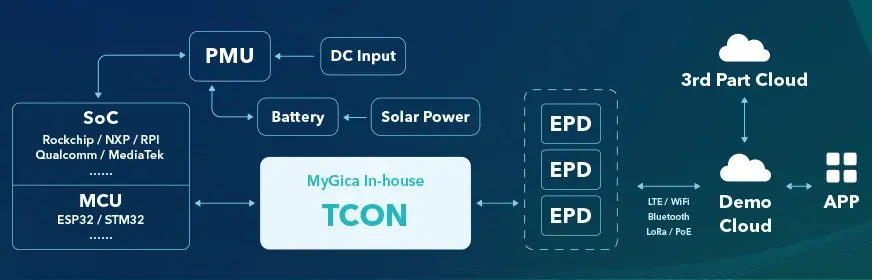
The Edge Hardware Layer
A conventional LCD system connects the host directly to the display with comparatively little in between. E-paper can’t do that, because the panel needs low power and precise, complex waveform control that a general-purpose host isn’t built to generate directly. That gap is filled by two components working together: a TCON board to handle the panel-specific driving, and a low-power MCU, embedded processor, or edge gateway to run the application logic without burning through a battery to do it.
This is the layer where most system-level design decisions actually originate — panel size, power budget, and refresh requirements all flow down into what this layer needs to be capable of. We cover what the TCON specifically does, and why it’s a separate component rather than something folded into a generic host, in our TCON board explainer. On the MCU/gateway side, platform choice spans a real range — from lightweight, battery-oriented controllers to full-OS platforms — covered in our interface and platform guide, or browse the TCON & Controller product line directly.
The Driving / Waveform Control Layer
Underneath the TCON board itself is the layer actually responsible for generating the voltage sequences that move pigment particles — the waveform. This is where high-voltage rail design, power sequencing, and temperature-compensated driving all live, and it’s the layer most likely to cause real hardware bring-up problems if it’s under-engineered. Our development pitfalls guide covers the specific failure modes here — ripple showing up as visual artifacts, cold-weather refresh failures — in practical detail.
The Interface Layer
Two distinct links sit in this layer: MCU/SoC to TCON, and TCON to panel. SPI, parallel TTL, and mini-LVDS all show up here, and which one fits depends on panel size, refresh speed requirements, cable length, and how much integration complexity you want to own on your own board versus offload to the TCON. This is covered in full in our data interface guide.
The Firmware / Refresh Management Layer
This is the layer that decides when and how a refresh actually happens — full refresh versus partial, how ghosting is managed over successive partial updates, and how dithering is handled within whatever memory budget the MCU layer actually has. It’s also where multi-zone layouts (a static visual paired with a frequently updated data field, covered in our piece on content vs. information display) add real state-tracking complexity. Our development pitfalls guide covers the specific scheduling and dithering trade-offs in more depth.
The Power Layer
Wired, battery, or solar — this decision cuts across nearly every other layer above it. It affects what the edge hardware layer needs to budget for, how aggressively the firmware layer needs to manage refresh frequency, and what the realistic maintenance cadence looks like once deployed. Our outdoor deployment guide covers how to evaluate this for a specific site, and our TCO guide covers how power choice flows into total lifecycle cost.
That covers the device itself. The remaining layers govern how it connects outward — to a network, to the cloud, and to whoever’s managing the fleet.
The Connectivity Layer
Connectivity requirements vary significantly depending on deployment scale, update frequency, and power availability. “Connect to Wi-Fi” isn’t an architecture decision — it’s a shortcut that works until battery life or deployment density becomes a real constraint. The right protocol depends heavily on two things: how dense the deployment is, and whether power comes from a wall or a battery. We cover this layer in full — including the specific radio and application-protocol trade-offs — in our connectivity architecture guide; the short version follows.
Indoor, high-density deployments — retail floors, office buildings, anywhere with dozens of units in a confined area — generally favor a self-built gateway architecture using Sub-1GHz radio, BLE Mesh, or Zigbee. These protocols trade wide-area range for lower power draw and better performance in dense, RF-crowded environments, routing traffic through a local gateway rather than having each unit maintain its own long-range connection.
Outdoor, distributed deployments — transit stops, city-wide signage, anything spread across a wide geographic area without a shared local gateway — point toward LTE-M, NB-IoT, or LoRaWAN instead. These cellular-IoT and LPWAN protocols are built specifically for infrequent, small-payload transmissions over wide areas on battery power, which matches how most e-paper content actually updates far better than a general-purpose Wi-Fi or standard cellular connection does.
Protocol choice at the application layer matters just as much as the radio technology underneath it. MQTT or CoAP — lightweight, low-overhead messaging protocols — are the right fit for e-paper, not a full HTTP REST API. E-paper content updates are typically small and infrequent, and don’t need the overhead a REST API carries per request. MQTT’s persistent, low-overhead connection model and CoAP’s UDP-based lightweight design both minimize radio-on time per update — which is where a meaningful share of a battery-powered unit’s total power budget actually goes. Running a full REST API stack over a battery-constrained radio link is a common, avoidable source of shortened battery life.
The Cloud Rendering & Data Layer
This is the layer that separates an amateur system design from a professional one — specifically, the decision of where rendering actually happens. We cover this decision in full in our edge vs. cloud rendering guide; the short version follows.
Option A: Edge rendering. The cloud sends only structured data — a JSON payload, for instance — and the edge device itself renders that data into the final bitmap image. The advantage is data volume: a structured payload can be a few bytes, extremely bandwidth- and power-efficient over a constrained radio link. The trade-off is that this places real demands on the edge MCU’s compute and memory — it needs enough capability to handle font rendering, layout, and image generation locally.
Option B: Cloud-to-image rendering. The server does the layout work centrally and converts it directly into a 1-bit or 4-bit BMP/PNG image, which gets sliced and sent to the device as-is. Edge hardware stays minimal — no font libraries, no layout engine, no local rendering logic — and complex typography or layout gets handled once, centrally, rather than replicated across every device’s firmware. This tends to suit larger-format e-paper, transit signage being a good example, where layout complexity is high and edge hardware is often less capable of handling it locally. The trade-off is data volume: sending a rendered image, even compressed, is meaningfully larger than sending structured data.
Neither approach is universally correct. The right choice depends on how capable your edge hardware actually is, how complex your content and layout requirements are, and how constrained your connectivity layer is on bandwidth versus power.
The Content Management Layer
The top of the stack: how content actually gets onto the display, and how the fleet gets managed once it’s live. This can mean a vendor-hosted CMS, or a hardware-plus-SDK/API approach where a client integrates their own backend directly — the model we used in a real off-grid transit deployment, where a client integrated their own AVL and passenger information systems directly rather than using a hosted platform. Which approach fits depends on whether a client already has backend infrastructure to integrate against — covered in more depth in our customization guide.
E-paper deployments also carry operational requirements a general digital-signage CMS doesn’t automatically account for, and these are worth designing in from the start rather than retrofitting later:
- Heartbeat mechanism — a periodic check-in from each unit confirming it’s alive and reachable. This matters more for distributed, battery-powered fleets than for wired signage, since a unit going silent could mean a dead battery, a network outage, or a genuine hardware fault — telling those apart remotely saves real truck rolls.
- Battery telemetry — reporting remaining charge or voltage back to the CMS, so maintenance gets scheduled proactively rather than discovered in the field after a unit has already gone dark.
- Environmental temperature monitoring — refresh quality depends on temperature-compensated waveform parameters, covered in our development pitfalls guide. The cloud or edge layer needs current temperature data to select the right waveform parameters for the conditions, which makes temperature reporting a direct input into how the driving layer actually performs, not just a monitoring nicety.
The Full Stack, at a Glance
| Layer | Solves | Go Deeper |
|---|---|---|
| Edge Hardware | Low-power, panel-specific driving a general host can’t do directly | TCON board explainer |
| Driving / Waveform | Generating the voltage sequences that actually move the image | Development pitfalls guide |
| Interface | Connecting MCU→TCON and TCON→panel at the right speed and distance | Data interface guide |
| Firmware / Refresh Logic | Deciding when and how a refresh happens, and managing ghosting | Development pitfalls guide |
| Power | Wired, battery, or solar, and what that means for every layer above | Outdoor deployment guide |
| Connectivity | Choosing the right radio and protocol for deployment density and power budget | — |
| Cloud & Rendering | Deciding where content actually gets rendered — edge or cloud | — |
| Content Management | Getting content onto the display and managing the fleet once it’s live | Customization guide |
FAQ
Why does e-paper need a TCON board when LCD systems don’t need an equivalent component?
LCD panels can generally be driven with simpler, more standardized signaling. E-paper needs precise, panel-specific waveform control to move pigment particles correctly — a general-purpose host isn’t built to generate that directly, so a dedicated TCON handles it.
Should I always use MQTT or CoAP instead of a REST API for e-paper devices?
For battery-powered, infrequently updating devices, yes, generally — the lower per-update overhead directly extends battery life. Wired, mains-powered deployments with less power sensitivity have more flexibility to use a REST API without the same cost.
Is edge rendering or cloud rendering the better architecture?
Neither is universally better — edge rendering minimizes data transfer at the cost of requiring more capable edge hardware; cloud-to-image rendering keeps edge hardware minimal at the cost of larger data transfers. The right choice depends on your edge hardware’s capability, content complexity, and connectivity constraints.
Do all eight layers apply to every e-paper project?
The layers are all present in some form, but how much design attention each one needs varies — a project using an integrated, off-the-shelf TCON board, a standard Wi-Fi connection, and a hosted CMS spends far less engineering effort on several of these layers than one building custom hardware, a custom radio architecture, and a custom backend.
Which layer is most likely to cause project delays?
Based on real project experience, the edge hardware and firmware layers — waveform driving and refresh scheduling specifically — tend to surface the most unexpected problems, since they’re the least visible from a spec sheet and the most dependent on real-world testing to get right.